


Asus ROG G752VS Notebook Review
Asus' G-series is the manufacturer's premium gaming lineup and is synonymous to performance. The predecessor model (G752VY) is currently in fourth place in our Top 10 ranking for gaming notebooks. Asus wants to change that with the new G752VS. There are no visual changes compared to the predecessor and Asus still uses the familiar ROG design.
A look at the specs, however, reveals some small but important changes. They suggest that our test model could be one of the fastest notebooks you can currently get. The Asus G752VS is equipped with the very powerful Intel Core i7-6820HK processor supported by 64 GB DDR4-RAM. The operating system is stored on a fast NVMe-SSD with a capacity of 512 GB. The most important change is the GPU. Asus equips the G752VS with the Nvidia GeForce GTX 1070. This means the Pascal architecture, which was launched about three months ago for desktops, is now available for the mobile segment. We just want to say that the Nvidia GeForce GTX 1070 is faster than the Nvidia GeForce GTX 980 (laptop).
A smooth picture without tearing is provided by Nvidia's G-Sync technology, which synchronizes the picture output from the GPU with the panel. We listed the rivals for the Asus G752VS below. These comparison devices will accompany us in this review and the benchmarks.
MSI GT72VR 6RE-015US
MSI GT62VR-6RE16H21 (2100 Euros, ~$2373)
Asus G752VY-RH71 ($3500)
Asus G752VT (1700 Euros, ~$1921)
Alienware 17 R3 (2000 Euros, ~$2260)
Schenker XMG U716 (3712 Euros, ~$4196)
Asus G752VS-XB78K (G752 Series)
Processor
Intel Core i7-6820HK 2.7 GHz @ 3.8 GHz (Intel Core i7)
Graphics adapter
NVIDIA GeForce GTX 1070 (Laptop) - 8192 MB, Core: 1493 MHz, Memory: 4150 MHz, GDDR5 (Samsung), ForceWare 372.53, kein Optimus
Memory
65536 MB
, 4x 16 GB DDR4-2400 SO-DIMM, 4 of 4 slots in use
Display
17.3 inch 16:9, 1920x1080 pixel 127 PPI, LG Philips LP173WF4-SPF3 (LGD04E8), a-Si TFT-LCD, 262K (6bit), CIE1931 72%, G-Sync, glossy: no
Mainboard
Intel CM236 (Skylake PCH-H)
Storage
Toshiba NVMe THNSN5512GPU7, 512 GB
, SSD + HGST Travelstar 7K1000 HTS721010A9E630, 1000 GB HDD @ 7200 rpm. Slots: 2x M.2 Type 2280 & 1x 2.5"
Weight
4.51 kg ( = 159.09 oz / 9.94 pounds), Power Supply: 780 g ( = 27.51 oz / 1.72 pounds)
CASE
The case does not differ from the predecessor (G752VY). Our test model's outside features a discreet silver/gold color. Asus uses a matte black soft-touch finish for the keyboard and the palm rests. The device feels premium to the touch. The build quality is flawless and there is hardly anything to criticize.

The G752VS is primarily made from metal and plastic. A ROG logo and two red accents, which can optionally be emphasized by the integrated light, adorn the stabile aluminum lid. Base unit and lid do not twist and we did not find anything to complain about in the pressure test, either. However, the device appears to be bulky at a first glance. In view of the incorporated components, which require decent cooling, this size is almost absolutely necessary.
The hinges do a good job and hold the display securely at any angle. There is a maintenance hatch on the underside, which can be easily removed after loosening a screw. It covers a 2.5-inch hard drive, two of four RAM modules, and the NVMe SSD in 2280 format. Top: Our test model features a free M.2 slot (RAID support). The transparent plastic window is a highlight, which gives an impression of the 3D Vapor Chamber. However, you can only get a glimpse of the cooling unit here. If you want to clean the fan, you have to completely disassemble the case, which is quite difficult; just as in other ROG models. Another small drawback is the sensitive soft-touch surface, which attracts fingerprints.
Interfaces
The port variety is the same as the predecessor's. For example, you will still get only four full-size USB 3.0 ports. Some users might wish for more USB ports. The MSI GT72VR brings a significantly higher port variety.
The interface layout is fair. There is sufficient space between the individual ports, so they do not block each other. However, cables might get in the way when using a right-hand mouse. Multimedia content can be sent to external devices via HDMI 2.0, Mini-DisplayPort 1.3 or WiDi. During our time with the device, we did not face problems with these interfaces. Gaming benchmarks ran flawlessly up to 4K resolution.

Left side: Kensington lock, 2x USB 3.0, DVD-RAM, SD-card reader

Right side: headphones, microphone, Line-in, USB 3.1 Type-C Gen. 2 + Thunderbolt 3, 2x USB 3.0, Mini-DisplayPort, HDMI, RJ45 Ethernet, AC power

Rear: ventilation grilles
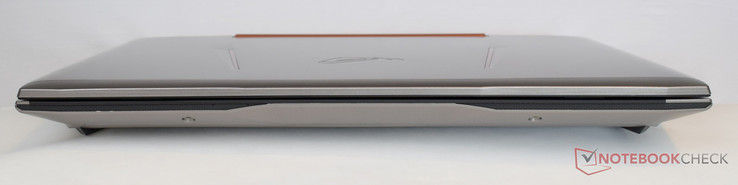
Front: no ports
SD Card Reader
The card reader is on the left side next to the optical drive. It supports all usual SD formats such as SD, SDHC, and SDXC. Inserted cards only just stick out of the slot, which minimizes the risk of accidentally damaging them.
We test the performance with our Toshiba Exceria Pro SDXC 64 GB UHS-II reference card. This test copies 250 .JPG files to the hard drive. We recorded an average transfer rate of 76 MB/s for the Asus G752VS. In sequential reading, which is simulated with the AS SSD tool, our test model achieved 86 MB/s. With this performance, the G752VS ranks in mid-range. Several competitors achieve significantly better results. Among the notebooks in our comparison group, the Schenker XMG U716 provides the best card reader performance.
SDCardreader Transfer Speed
average JPG Copy Test (av. of 3 runs)
Schenker XMG U716 (Toshiba Exceria Pro SDXC 64 GB UHS-II)
156 MB/s ∼100%+105%
MSI GT62VR-6RE16H21 (Toshiba Exceria Pro SDXC 64 GB UHS-II)
140 MB/s ∼90%+84%
MSI GT72VR 6RE-015US (Toshiba Exceria Pro SDXC 64 GB UHS-II)
135.3 MB/s ∼87%+78%
Alienware 17 R3 (A17-9935) (Toshiba Exceria Pro SDXC 64 GB UHS-II)
78 MB/s ∼50%+3%
Asus G752VS-XB78K (Toshiba Exceria Pro SDXC 64 GB UHS-II)
76 MB/s ∼49%0%
maximum AS SSD Seq Read Test (1GB)Schenker XMG U716 (Toshiba Exceria Pro SDXC 64 GB UHS-II)
204 MB/s ∼100%+134%
MSI GT62VR-6RE16H21 (Toshiba Exceria Pro SDXC 64 GB UHS-II)
190 MB/s ∼93%+118%
MSI GT72VR 6RE-015US (Toshiba Exceria Pro SDXC 64 GB UHS-II)
186.3 MB/s ∼91%+114%
Alienware 17 R3 (A17-9935) (Toshiba Exceria Pro SDXC 64 GB UHS-II)
87 MB/s ∼43%0%
Asus G752VS-XB78K (Toshiba Exceria Pro SDXC 64 GB UHS-II)
86 MB/s ∼42%-1%
Communications
Game First IV

The Asus G752VS has been equipped with a dual band AC 8260 module from Intel for wireless communication. The 802.11ac 2x2 features a theoretical gross transfer rate of 867 Mbit/s. In our test, the 17-inch laptop achieved 465 Mbit/s in sending and 566 Mbit/s in receiving. These results are not sufficient for outperforming the MSI GT62VR, which achieves a better result.
Those who prefer wired networking can connect via the Ethernet port. The latter allows a maximum transfer rate of 1000 Mbit/s.
The GameFirst IV tool allows prioritizing network traffic depending on the application. You can use this feature for granting priority to games. This is possible for LAN and WiFi connections.
Input Devices Keyboard
A glance at the G752VS's keyboard does not show changes. The layout is identical to the predecessor's. The keys are sufficiently big and there is a gap of 3 mm between them. The key travel is just under 2.5 mm. The surface of the keys is matte and makes for a high-end experience. The build quality is flawless. Nothing clatters or wobbles. The red three-level backlight is an optical highlight. According to Asus, the keyboard is capable of registering and processing up to 30 inputs at a time.
Above the keyboard, there are five macro keys and a quick-select button, which is linked to the XSplit Gamecaster for recording or streaming game scenes.
Unlit keyboard
Lit keyboard


Unlit keyboard
Lit keyboard

Touchpad
Touchpad of the Asus G752VS
Alike the keyboard, the touchpad has not been changed in shape and size compared to the predecessor. The trapezoidal surface (~12 x 6.8 cm) allows smooth and precise gliding. The input device does not work flawlessly in the corners. The Asus Software Smart Gesture brings additional options and is capable of recognizing up to four fingers.
The separate mouse buttons are slightly rubberized and sufficiently "grippy". The travel is similar to the keyboard's. The acoustic feedback is discreet and pleasantly quiet.
Verdict
The high-end notebook from Asus certainly does not have to hide behind the rivals, quite the contrary. Users of the Asus G752VS will get a lot of performance. The Pascal launch starts a new era for gaming notebooks and even clearly surpasses the performance of the predecessor generation.
Nvidia's GeForce GTX 1070 is the second-fastest single-GPU solution you can currently get, and only the Nvidia GeForce GTX 1080 is even faster. Asus equips the G752VS with a very fast Intel Core i7-6820HK. There are also no concerns in terms of memory, because 64 GB DDR4-RAM is easily sufficient even for very demanding applications.
Asus managed to improve the performance of the G752VS significantly and it is even powerful enough for modern titles in 4K and medium to high details. The build quality is fully convincing. Small extras like G-Sync and macro keys are advantages specifically for gamers.
It requires a clever cooling solution to keep the enormous performance under control. The 3D Vapor-Chamber cooling module for the Nvidia GeForce GTX 1070 is sufficient and the GPU performance can be utilized all the time. You can clearly hear the device, but it is still reasonable. You should not be scared off by the weight if you plan to buy such a device. The Asus is quite a heavy piece at 4.5 kilograms, but that was to be expected.
Comments